
Briteskies Health Check for IBM i
Keep your IBM i OS secure, supportable, and ready for what’s next.
Our Health Check for your IBM i operating system helps your team assess health, support readiness, security, performance, and continuity risks so you can identify priorities and plan next steps with confidence.
Why Now is a Good Time to Evaluate Your IBM i OS
For many teams, IBM i continues to support critical operations reliably, but that does not always mean the environment is easy to maintain, fully documented, or well positioned for future needs.
An OS system health check helps uncover issues that may be easy to miss day to day, including:
- support lifecycle concerns
- security and configuration gaps
- performance and capacity risks
- undocumented dependencies
- staffing and continuity challenges
- modernization priorities that need clearer sequencing
Whether your team is planning ahead or responding to growing pressure on internal resources, a focused assessment can help you understand where you stand and what to address next.
Schedule time with our team to talk through your IBM i OS, current concerns, or continuity needs.
After you submit the form, we’ll follow up to schedule a conversation and learn more about your environment and priorities.
Prefer to talk sooner? Call 216-369-3600
What’s Included
Our OS system health check is designed to provide a practical view of your current environment. Depending on your needs, it may include a review of:
- system configuration and overall health
- support status and version considerations
- security posture and operational risk
- performance and resource concerns
- staffing, documentation, and continuity needs
- application dependencies and support considerations
What We Often Find
Common findings may include:
- systems approaching support deadlines
- configuration or security issues that have not been revisited in years
- performance concerns tied to growth or changing usage
- knowledge concentrated in too few people
- limited documentation for business-critical processes
- uncertainty around upgrade timing, ownership, or continuity planning
In many environments, the technical issue is only one part of the challenge. Teams are also managing limited internal bandwidth, succession concerns, and gaps in specialized IBM i knowledge.
What You Receive
After the assessment, your team walks away with:
- a clearer picture of current risks and priorities
- documented observations and findings
- guidance on where action may be needed
- practical next-step recommendations
- a stronger foundation for planning support, modernization, or internal transition needs
Example Findings from a Briteskies Health Check
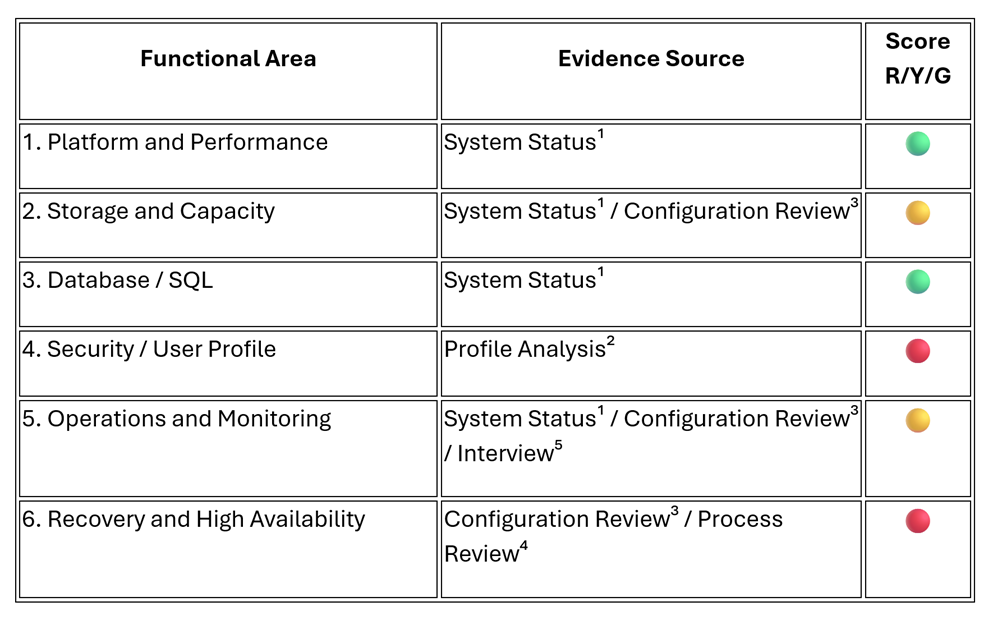
Sample Functional Areas & Observations
Platform and Performance
- CPU utilization remained at low levels during the review period
- Job and thread counts were below documented system limits
- Memory pools were balanced with no sustained paging observed
- No capacity constraint events were identified during the assessment window
Storage and Capacity
- Disk utilization was approximately 33% of total capacity
- Capacity thresholds were not formally documented
- IFS inventory review was not recently evidenced
- IFS growth monitoring was not formally defined
Database/SQL
- SQL plan cache was operating under automatic sizing
- No observed SQL performance alerts were identified during the review period
- No sustained database resource pressure was observed
Security/User Profile
- Profile analysis identified security and user profile concerns requiring further review
Operations and Monitoring
- Monitoring and operational review identified opportunities to strengthen documentation, configuration visibility, and routine oversight
Recovery and High Availability
- Recovery processes and supporting documentation showed areas that required additional review and clarification
Every IBM i environment is different, but it can be helpful to see the type of output a review can produce. Below is an illustrative example of how findings may be organized across key operational areas.
IBM i Support Status is Worth Reviewing
For many organizations, support lifecycle timing is one of the clearest reasons to take a fresh look at the environment. This table helps frame why a health check can be timely.
If your environment is running on an older release, or if your team is unsure how support status affects planning, staffing, or upgrade timing, this is a good place to start the conversation.
| IBM i Version | Standard Support | Extended Support |
| 7.6 | TBA | TBD |
| 7.5 | TBA | TBD |
| 7.4 | Sept. 30, 2026 | Sept. 30, 2029 |
| 7.3 | Sept. 30, 2023 | Sept. 30, 2028 |
| 7.2 | Apr. 30, 2021 | Apr. 30, 2026 |

Looking beyond the assessment?
If your team is also thinking about support coverage, knowledge transfer, continuity planning, or next-step recommendations after the review, we can discuss that as part of the conversation.

Why Briteskies
IBM i experience grounded in real-world operations, with practical guidance for continuity, documentation, support readiness, and next steps.